iPhone Battery Health: Check Capacity & Cycles
Monitoring Your iPhone's Battery Vitality
By Decode Today News
For consumers in the US, UK, and Canada, understanding the state of your iPhone's battery health is crucial, whether you're investing in a new device or evaluating a pre-owned one. While new iPhones are engineered for longevity, all rechargeable batteries are consumable components that undergo chemical degradation over time. This natural process leads to a diminished ability to hold a charge, directly impacting a device's daily utility and overall user experience.
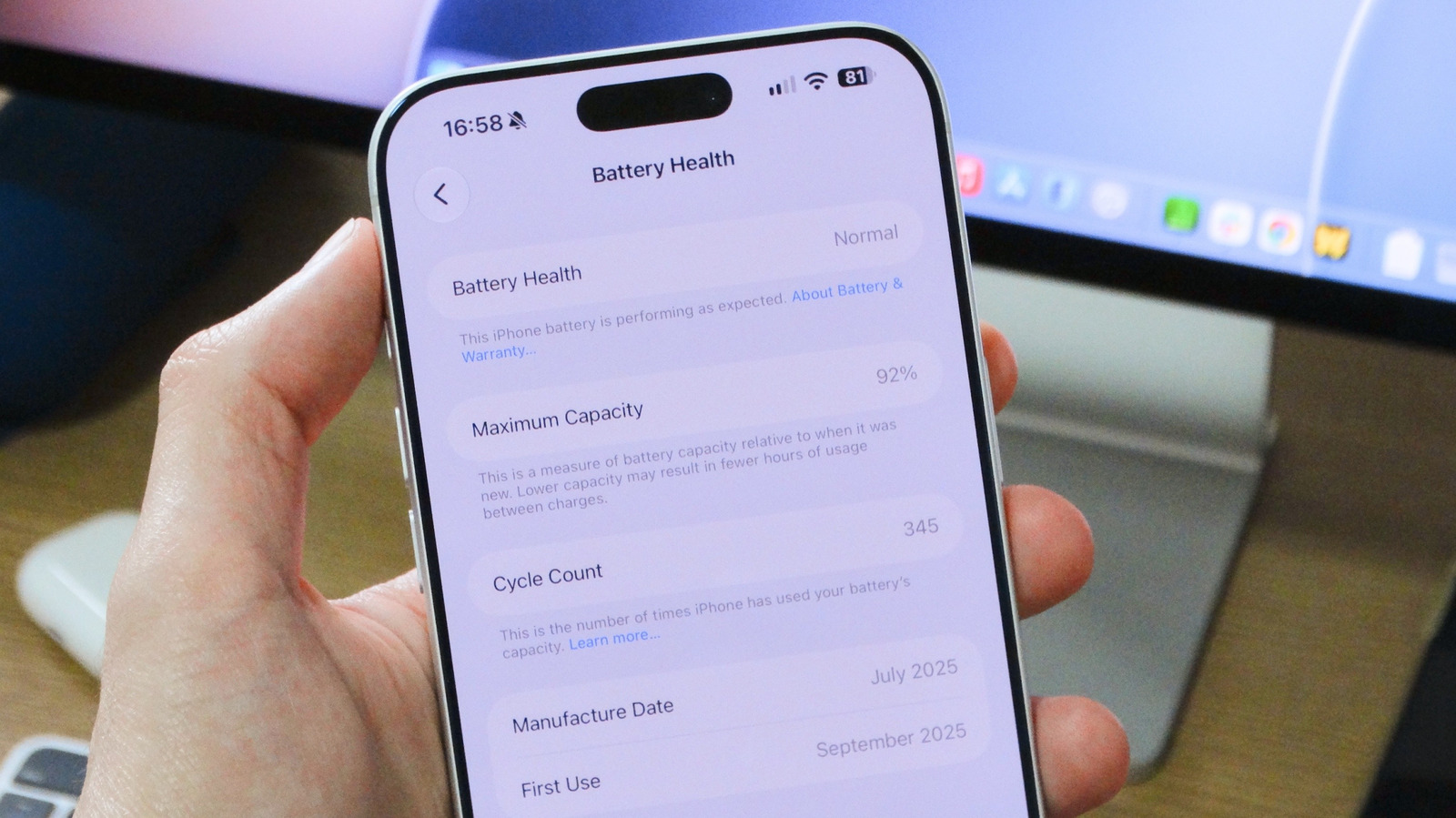
Apple integrates proprietary tools directly into iOS, offering users a transparent view of key battery metrics. These include the maximum capacity relative to a new battery and the cycle count, which quantifies the number of full charge-discharge cycles a battery has completed. Monitoring these indicators is fundamental for gauging a battery's expected performance, anticipating potential replacement needs, and making informed purchasing decisions for used iPhones, where battery condition directly correlates with long-term value and consumer demand.
Accessing Battery Health Metrics on Your iPhone
Checking your iPhone's battery health is a straightforward process, designed for user accessibility. To initiate, navigate to the Settings app on your iPhone, then tap on "Battery." Within this section, locate the "Battery Health" area. For certain older models, such as the iPhone 13, this section is explicitly labeled "Battery Health & Charging."
This dedicated screen provides an immediate estimate of your iPhone's current battery capacity, presented as a percentage relative to its capacity when it was new. This figure, termed "Maximum Capacity," offers a concise snapshot of the battery's overall condition. Alongside this percentage, users will find other pertinent information designed to clarify the battery's operational status.
Decoding Maximum Capacity and Performance Thresholds
The "Maximum Capacity" percentage is a key metric for understanding your iPhone battery's health. According to Apple, a typical battery is engineered to retain up to 80 percent of its original capacity under standard operating conditions. When the battery health metric falls below this 80 percent threshold, users are likely to observe a notable reduction in battery life, signaling a potential shift in the device's operational efficiency.
In scenarios where a battery is severely degraded, iOS may autonomously activate additional performance management features. This measure is a preventative step designed to avert unexpected device shutdowns, which can occur when a compromised battery struggles to supply peak power demands. If such a feature is enabled, a specific warning will appear beneath the "Peak Performance Capability" section, providing users with explicit notification. The absence of this warning generally indicates that your iPhone's battery is functioning optimally without performance limitations.
- Maximum Capacity: A percentage reflecting current battery capacity relative to when it was new.
- 80 Percent Threshold: Apple's benchmark for optimal battery health; below this, significant degradation is expected.
- Performance Management: iOS feature enabled to prevent unexpected shutdowns due to degraded batteries.
Extending Your iPhone Battery's Lifespan
To proactively safeguard and prolong your iPhone's battery health, Apple offers built-in features designed to optimize charging patterns. One such feature is Optimized Battery Charging, found within the battery settings. When activated, this intelligent system learns your daily charging routines. It strategically pauses charging once the battery reaches 80 percent and only completes the charge to 100 percent closer to the time you typically unplug and begin using your device. This method minimizes the time your iPhone spends at a full charge, which can be beneficial for long-term battery integrity.
For users of the latest models, specifically the iPhone 15 and later, Apple has introduced an additional control feature: the ability to set a maximum charge limit for the device. This allows users to cap the charging process at a specific percentage below 100 percent, further aiding in the preservation of battery health over an extended period. These features represent key aspects of consumer demand for greater control over device longevity and contribute to the operating margin by reducing potential service costs.
Understanding iPhone Charge Cycles
Beyond maximum capacity, the battery cycle count is another critical metric for assessing an iPhone's battery lifespan. A single charge cycle is completed each time you use a cumulative 100 percent of your battery's capacity. This doesn't necessarily mean draining the battery from 100 percent to zero in one go. For instance, if you use 50 percent of the battery's charge, then recharge it, and later use another 50 percent, that cumulative 100 percent discharge equates to one complete charge cycle.
Tracking this metric is invaluable for understanding how heavily a device has been used and its long-term potential. It provides a more objective measure than just perceived battery life, directly influencing the device's market valuation, especially in the secondary market.
How to Check Your iPhone's Cycle Count
For owners of an iPhone 15 or newer model, Apple has integrated a convenient method to directly view the battery's cycle count within the device's settings. This information can be found by navigating to Battery > Battery Health and then scrolling down to locate the "Cycle Count" entry. This native integration significantly enhances user access to critical device diagnostics.
Conversely, if you possess an older iPhone model, Apple does not currently provide an inherent, in-app method for checking the battery cycle count. In such cases, users must rely on reputable third-party alternatives. A popular and widely recognized solution for this is the Mac app coconutBattery, which allows users to connect their iPhone to a Mac and retrieve detailed battery statistics, including the cycle count. This offers a valuable workaround for those seeking comprehensive data on older devices.
Cycle Count Benchmarks and When to Consider Replacement
Apple provides clear guidelines regarding expected battery performance based on charge cycles. For iPhone 15 models and later, the batteries are rated to maintain good health for up to 1,000 full charge cycles before anticipated significant degradation. For older iPhone models, the rating is typically set at up to 500 cycles. These figures offer a critical benchmark for consumers to gauge the expected lifespan and operational efficiency of their devices.
To put these numbers into perspective for real-world usage, 1,000 charge cycles generally translate to approximately two to three years of typical use. Reaching these cycle counts doesn't imply an immediate battery failure; rather, it indicates that the battery's overall capacity will likely be lower, leading to shorter battery life between charges. This directly impacts user convenience and the device's overall utility. When considering replacement, understanding these cycle counts aids in making an informed decision that supports the device's long-term operational integrity and user satisfaction.
| iPhone Model | Rated Full Charge Cycles | Approximate Lifespan (Typical Use) |
|---|---|---|
| iPhone 15 & Later | Up to 1,000 cycles | 2-3 years |
| Older Models (e.g., iPhone 14, 13) | Up to 500 cycles | 1-2 years |
If your iPhone's battery health has fallen below the 80 percent threshold or if it has reached its rated maximum charge cycles (e.g., 1,000 for newer models or 500 for older ones), it is generally advisable to consider a battery replacement to ensure your phone continues to operate smoothly and reliably. The most recommended course of action for this service is to contact Apple Support directly to arrange for a professional battery replacement. This approach helps maintain the device's integrity and guarantees the use of genuine Apple components, which is critical for cybersecurity risk management and overall device performance.
The Economics of iPhone Battery Replacement
From an investment perspective, understanding and addressing iPhone battery degradation is a key aspect of maximizing the total addressable market value of your device. A healthy battery not only ensures optimal daily use but also significantly impacts the resale value, contributing to better consumer demand in the secondary market. Proactive replacement, when indicated by capacity or cycle count, can extend a device's useful life, thereby improving its long-term cost efficiency and overall operating margin for the owner.
Neglecting battery health can lead to a domino effect, including reduced performance, unexpected shutdowns, and diminished user satisfaction, ultimately driving down the device's perceived and actual worth. For both individual consumers and businesses managing fleets of devices, treating battery health as a critical component of asset management can yield tangible benefits in terms of device longevity and financial return.


